# XML Import error - No article records were found
**URL:** https://forum.shopware.com/t/xml-import-error-no-article-records-were-found/54768
**Category:** International (English Only)
**Tags:** general
**Created:** [23. August 2018 um 11:55 UTC](https://forum.shopware.com/t/xml-import-error-no-article-records-were-found/54768 "2018-08-23T11:55:17Z")
**Posts on this page:** 4
**Page:** 1
### Author:  [@Seeh](https://forum.shopware.com/u/Seeh)
#### Post date: [23. August 2018 um 11:55 UTC](https://forum.shopware.com/t/xml-import-error-no-article-records-were-found/54768/1 "2018-08-23T11:55:17Z")
hello 🙂
what this „No article records were found“ mean?
compared to [https://community.shopware.com/files/DataImportExport/Article.xml](https://community.shopware.com/files/DataImportExport/Article.xml)
i using a xml file without ( and add it into backand gui import form [http://192.168.178.29:8080/backend/](http://192.168.178.29:8080/backend/) ) :
1. ordernumber
2. mainnumber
3. supplier
4. instock
5. stockmin
6. shippingtime
7. added
8. … and some mor tags i not have addet into the xml-file
which of them i relly need? may there is only one of them i need to add.
BTW in the based of fileld (second pulldown field in the backend) i always use: default\_articles (Articles)
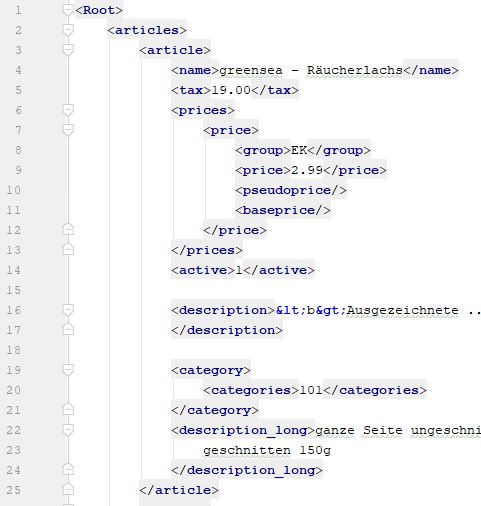
here a littel (not complete) comparison beetween my xml and the xml [https://community.shopware.com/files/DataImportExport/Article.xml](https://community.shopware.com/files/DataImportExport/Article.xml)

first lines of my XML:
---
### Author:  [@Seeh](https://forum.shopware.com/u/Seeh)
#### Post date: [23. August 2018 um 14:17 UTC](https://forum.shopware.com/t/xml-import-error-no-article-records-were-found/54768/2 "2018-08-23T14:17:40Z")
i have to say
no import is wrking.
i will write more about it if i have more time
thanks
---
### Author:  [@Moritz\_Naczenski](https://forum.shopware.com/u/Moritz_Naczenski)
#### Post date: [23. August 2018 um 16:42 UTC](https://forum.shopware.com/t/xml-import-error-no-article-records-were-found/54768/3 "2018-08-23T16:42:13Z")
1. ordernumber
2. mainnumber
3. supplier
Those are required fields.
---
### Author:  [@Seeh](https://forum.shopware.com/u/Seeh)
#### Post date: [24. August 2018 um 08:12 UTC](https://forum.shopware.com/t/xml-import-error-no-article-records-were-found/54768/4 "2018-08-24T08:12:23Z")
danke für die antwort. habe gestern abend alles auf nur einen artikel minimiert. und mehrmals variiert.
das geht ganz gut. scheinbar wird der einfach immer neu überschrieben so das man gut experimentieren kann.
dann einfach das demo xml genommen und dort ein bisschen gelöscht [https://community.shopware.com/files/DataImportExport/ArticleMinimal.xml](https://community.shopware.com/files/DataImportExport/ArticleMinimal.xml)
wenn merkt das man dabei eigentlich nix kaputt macht. kommt man so auch schön vorran 🙂