# How to upload image throu light weight plugin??
**URL:** https://forum.shopware.com/t/how-to-upload-image-throu-light-weight-plugin/53349
**Category:** Programmierung
**Created:** [7. Juni 2018 um 18:04 UTC](https://forum.shopware.com/t/how-to-upload-image-throu-light-weight-plugin/53349 "2018-06-07T18:04:47Z")
**Posts on this page:** 8
**Page:** 1
### Author:  [@Rizwan](https://forum.shopware.com/u/Rizwan)
#### Post date: [7. Juni 2018 um 18:04 UTC](https://forum.shopware.com/t/how-to-upload-image-throu-light-weight-plugin/53349/1 "2018-06-07T18:04:47Z")
Hello sir !I have made a image upload plugin and it has made thro shopware lightweight module but i have in trouble when i upload image
1)how to define a path where my image has to be physically save
2)how to save this this image name into database and then how to retrive it as well in any page
i have installed lightweight plugin and used as well but their is no option such like that so kindly help me sir my action is :
```
**public function** setAction() { //$basePath = $this-\>request-\>getBasePath().'/media/upload/'; $uploadedFile = ''; /\*if(!empty($\_FILES["file"]["type"])){ $fileName = time().'\_'.$\_FILES['file']['name']; echo $fileName;die(); $temporary = explode(".", $\_FILES["file"]["name"]); $sourcePath = $\_FILES['file']['tmp\_name']; $targetPath = $this-\>request-\>getBasePath().'/media/upload/'. $fileName; if(move\_uploaded\_file($sourcePath,$targetPath)){ $uploadedFile = $fileName; } }\*/ $name = $this-\>Request()-\>getParam('name'); //$image = $this-\>Request()-\>$fileName; $articleid = $this-\>Request()-\>getParam('articleid'); $image = $this-\>Request()-\>file\_put\_contents('file', 'name'); **echo** $image; **die** (); $desc = $this-\>Request()-\>getParam('desc'); $desclong = $this-\>Request()-\>getParam('desclong'); $sts = $this-\>Request()-\>getParam('sts',0); $sql = "insert into bcgh\_custom\_data (name,article\_id, description, descriptionLong,active,image) values ('{$name}', {$articleid}, '{$desc}', '{$desclong}',{$sts},'{$image}')"; var\_dump($sql); **die** (); $data = Shopware()-\>Db()-\>exec($sql); /\*return $this-\>redirect( array( 'controller'=\> 'ExampleModulePlainHtml', 'action' =\> 'index')
```
);
}
what would i used here properly
my input field name is „image“ my target action is setAction
---
### Author:  [@optimondo](https://forum.shopware.com/u/optimondo)
#### Post date: [8. Juni 2018 um 06:56 UTC](https://forum.shopware.com/t/how-to-upload-image-throu-light-weight-plugin/53349/2 "2018-06-08T06:56:50Z")
Hey Rizwan,
I think what you are looking for, is the [Media Service](https://developers.shopware.com/developers-guide/shopware-5-media-service/#check-if-a-files-exists). So you can easily check if a product image/file exists and if necessary upload a new one.
Creating the correct paths takes over the service for you.
Create a folder via SFTP/FTP, e.g. “pdf”, “upload” or what ever.
Here is a small example for u:
```
$mediaService = Shopware()->Container()->get('shopware_media.media_service');
// Whatever u want do with the name
$_name = $_FILES['file']['name'];
$_file_content = file_get_contents($_FILES['file']['tmp_name']);
// Check
if($mediaService->has("media/pdf/$_name") === false){
// upload to media Folder in md5 Format
try {
$mediaService->write("media/pdf/$_name", $_file_content);
} catch(Exception $e) {
echo '';
print_r($e);
echo '';
exit;
}
}
.
..
```
I hope I could give you a little inspiration.
Regards
---
### Author:  [@BestShopPossible](https://forum.shopware.com/u/BestShopPossible)
#### Post date: [8. Juni 2018 um 06:57 UTC](https://forum.shopware.com/t/how-to-upload-image-throu-light-weight-plugin/53349/3 "2018-06-08T06:57:50Z")
[https://developers.shopware.com/developers-guide/shopware-5-media-service/](https://developers.shopware.com/developers-guide/shopware-5-media-service/)
---
### Author:  [@Rizwan](https://forum.shopware.com/u/Rizwan)
#### Post date: [8. Juni 2018 um 07:05 UTC](https://forum.shopware.com/t/how-to-upload-image-throu-light-weight-plugin/53349/4 "2018-06-08T07:05:17Z")
ok i will try n then let u know Optimondo
Regards
---
### Author:  [@Rizwan](https://forum.shopware.com/u/Rizwan)
#### Post date: [8. Juni 2018 um 09:23 UTC](https://forum.shopware.com/t/how-to-upload-image-throu-light-weight-plugin/53349/5 "2018-06-08T09:23:25Z")
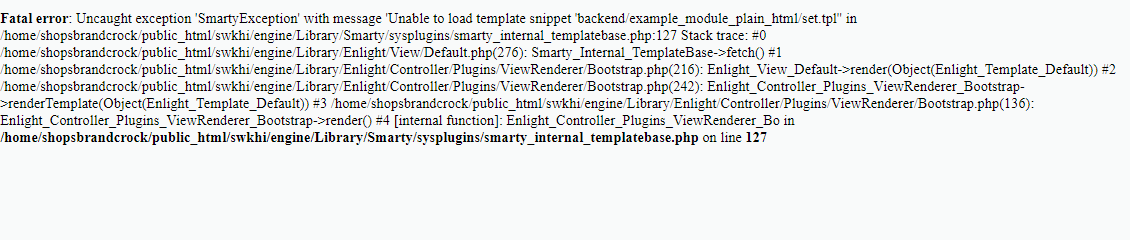
when submit form it’s showing this error can you help me more please what should i do now and when i revoke the try case n var\_dump $\_file\_content it show null
---
### Author:  [@BestShopPossible](https://forum.shopware.com/u/BestShopPossible)
#### Post date: [8. Juni 2018 um 09:36 UTC](https://forum.shopware.com/t/how-to-upload-image-throu-light-weight-plugin/53349/6 "2018-06-08T09:36:09Z")
try to use setNoRender()
---
### Author:  [@Rizwan](https://forum.shopware.com/u/Rizwan)
#### Post date: [8. Juni 2018 um 09:52 UTC](https://forum.shopware.com/t/how-to-upload-image-throu-light-weight-plugin/53349/7 "2018-06-08T09:52:03Z")
```
Shopware()-\>Plugins()-\>Controller()-\>ViewRenderer()-\>setNoRender(); $mediaService = Shopware()-\>Container()-\>get('shopware\_media.media\_service'); $\_name= $\_FILES['image']['name']; var\_dump($\_name);die(); $\_file\_content = file\_get\_contents($\_FILES['image']['tmp\_name']); var\_dump($\_file\_content);die(); if($mediaService-\>has("media/upload/$\_name") === false){ try { $mediaService-\>write("media/upload/$\_name", $\_file\_content); } catch(Exception $e) { echo '
'; print\_r($e); echo '
'; exit; } } still it shows null
```
---
### Author:  [@Rizwan](https://forum.shopware.com/u/Rizwan)
#### Post date: [8. Juni 2018 um 11:56 UTC](https://forum.shopware.com/t/how-to-upload-image-throu-light-weight-plugin/53349/8 "2018-06-08T11:56:14Z")
thank you sir with the help of yours i have resolved the issue n now my image has beeen saving both side